By
By
Deal protection guidelines
Protect your deals and guarantee your payout by registering every prospective client immediately upon initial qualification.
Your unique partner link will be issued immediately after contract execution and onboarding completion. To ensure every lead is correctly tracked and credited to your account, all prospective client submissions must be made through this specific link.
Before You submit: minimum deal size
⚠️ Important Requirement: The CAKE.com Partner Program is strictly limited to opportunities with a minimum of 20 seats on an annual subscription, unless explicitly defined otherwise in your Partner Agreement. If your prospect does not meet this requirement, please contact your Partner Manager to discuss alternative options before submitting.
The "First-In" rule
We operate on a strict "first-in" policy to safeguard your sales efforts. Register qualified opportunities immediately so our team can perform an automated database collision check.
Disqualification Rules:
A prospect is ineligible for account allocation if they are:
- An existing CAKE.com customer.
- Already actively engaged with our internal sales team.
If the prospect is clear, your lead will be approved instantly to guarantee your account ownership and pipeline protection.
How to submit a new lead
Step 1 - Access your unique link
To initiate deal registration, navigate to your unique partner link and fill out the secure submission form.
Step 2 - Complete the submission form
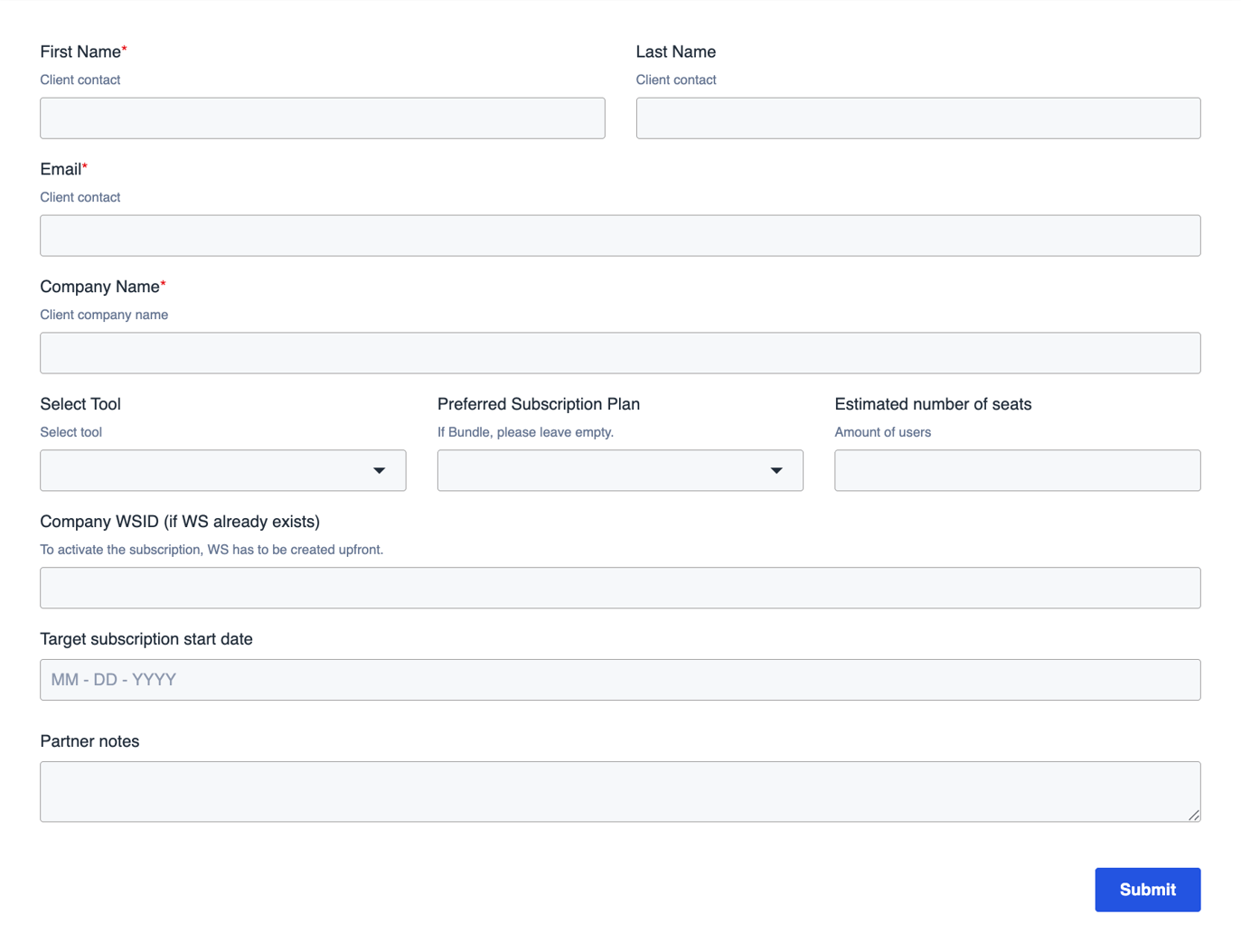
Provide accurate data across these three core sections to ensure fast lead processing:
- Contact Information: Primary decision-maker details (First/Last Name, Corporate Email, Legal Company Name).
- Deal Scope: Target product line, plan tier, and anticipated seat volume (e.g., Pumble Enterprise – 50 seats).
- Sales Context & Notes: Relevant deal insights, such as current account relationship, budget status, key operational bottlenecks, or required API integrations.
Your lead & closing the deal
Phase 1: Database check & approval
Submitting the form triggers an instant database validation. Within 24 business hours, you will receive an official status update confirming account allocation and pipeline authorization.
Phase 2: Finalizing the sale (Activation & Invoicing)
When your client is ready to purchase, notify CAKE.com to begin account deployment and invoicing. Send the following details directly to your Partner Manager:
-
Workspace Info: The exact Company Name and Account Owner Email used to set up the client's workspace.
-
Billing Data: Official corporate Billing Address and Tax/VAT Registration Number.
-
Order Details: Selected Subscription Tier, exact Seat Count, and target Software Activation Date.
Upon receipt, our operations team will issue the invoice, provision the environment, and queue the deal for commission processing. As a partner, once your client is ready to proceed with the purchase, you must notify CAKE.com to initiate deployment and billing.
Locating your workspace ID
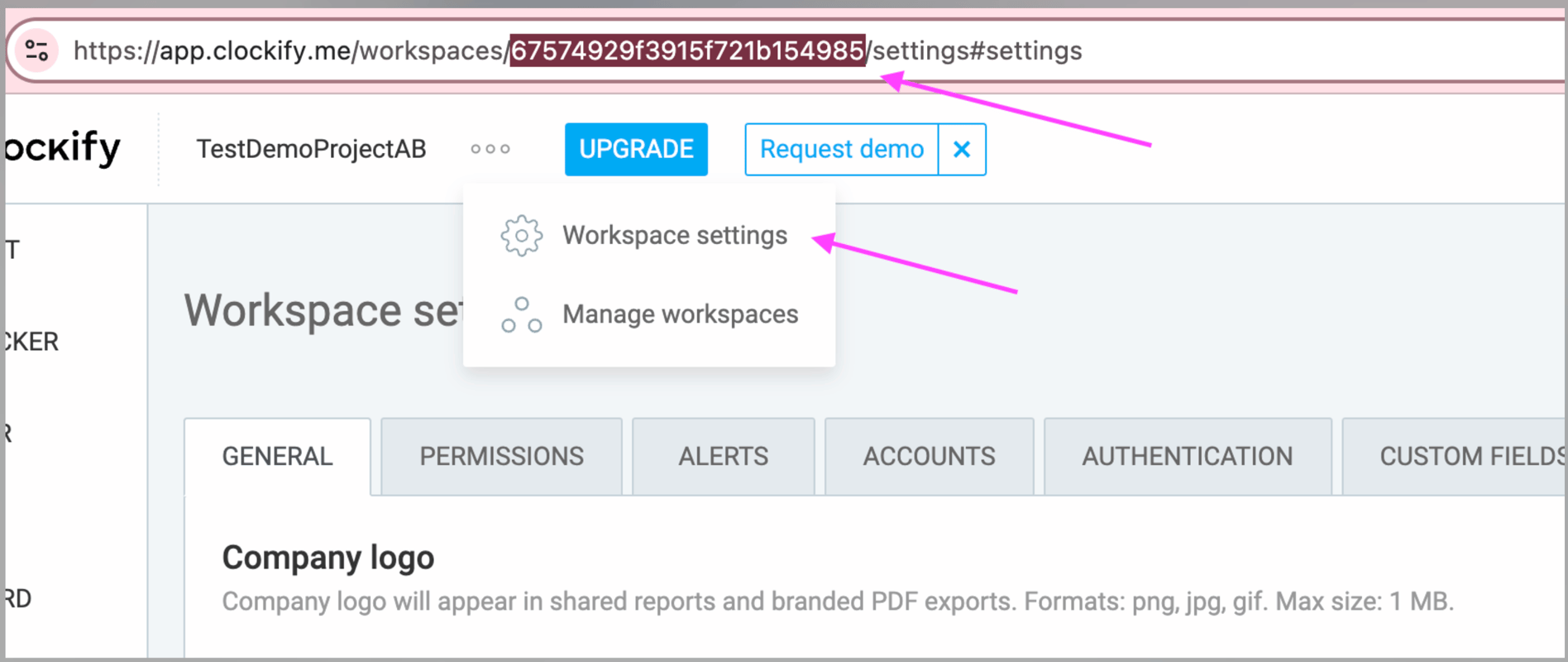
You can find the Workspace ID (WS ID) directly in your account URL or settings panel, as illustrated below:
How to claim your commission (Payout Process)
Commission eligibility is triggered immediately upon receipt of the client's initial invoice payment to CAKE.com.
Submitting your invoice:
Please issue an official invoice to CAKE.com for the earned commission amount. To avoid payment holds or accounting delays, ensure all required line items and banking instructions are included as outlined below:
1. Required line item details
In the "Description" or "Item" section of your invoice, you must clearly map the exact client workspace details. Please format it exactly like this:
- Item: Partner Commission for [Client Company Name]
- Details Required:
- Workspace ID (WS ID): (e.g., WS-98765)
- Subscription Plan: (e.g., Clockify Pro)
- Total Number of Seats: (e.g., 45 Seats)
Example Line Item: Partner Commission for Acme Corp (WS-98765) - Clockify Pro, 45 seats.
2. Clear payment instructions
Your invoice must include complete, explicit payment instructions at the bottom. Please ensure your Bank Name, IBAN/Account Number, Swift/BIC Code, or preferred electronic payout routing details are fully visible.